Via a MacRumors Forum thread, I've just discovered a brand new OS 9 site called Mac OS 9 Lives. It's still building (in fact, when I wasn't looking they added a new Digital Audio Workstation section), and it has a user forum, so go over and check it out.
Also of interest are a few other OS 9 links:
OS9.net (some of their links may be old)
68k Macintosh Liberation Army Forums
Old Mac Archive - Abandonware for pre-OSX Macintosh computers
Macintosh Garden - Celebrating macintosh abandonware!
Showing posts with label Mac OS 9. Show all posts
Showing posts with label Mac OS 9. Show all posts
Friday, October 26, 2012

Thursday, April 26, 2012
Essential Additions To Your Mac OS 9 Default Install
When you install OS 9, it comes with many things out of the box, some of which are cool, and some of which are hopelessly outdated like IE 5 and Netscape 4. So I thought I'd compile a short list of additional software that will bring your OS 9 system more up to date in the age of bell bottoms. Bell bottoms--those are a thing now, right?
Anyway, here's the list:
Audion was iTunes before iTunes and in addition to mp3s also plays ogg files. Attractive, non-intrusive interface.
Classilla is a web browser based on Mozilla and still under development. Comes with NoScript built-in and you can set its user agent to a mobile device to have websites default to their mobile sites for speed.
Acuity is a simple rss reader.
FLVPlayer plays flv files saved to disk.
YTBrowser9 plays Youtube on OS 9! The homepage is in Japanese, so check here for english instructions.
Flash 7 is required for YTBrowser9, I believe.
Divx 5.1.1 plays some divx encoded videos, but not all. It's a bit of a crapshoot.
Xvid Delegate Component delegates xvid files to be played with the Divx codec. I've never tried this, but it's worth a shot.
iText is a word processor that saves to rtf and was updated as recently as 2009.
ATI_OS9_RADEON_Update_9_2_2_jan2005 is the final update for ATI drivers and is required for later cards like a Radeon 9000. The link takes you to a thread with download links and more information.
DVD Extractor is needed to mount .toast images.
NetPresenz provides ftp for OS 9, which may be the only networking option with Macs running Lion.
CreaseProof fixes creator code problems that might arise from networking files.
PrinTtoPDF duplicates the built-in function in OS X.
MacPython is an OS 9 development environment for python, so if you want to write your own python scripts, go crazy.
Mini vMac on OS 9 is a bit of nostalgia within nostalgia as it emulates a Macplus.
And Virtual PC is needed for bittorrent because the only bittorrent clients that still work on OS 9 were for Windows:(
And there you have it. With these titles installed, you'll find the OS to be not quite as ancient. In fact, when I boot into OS 9 to do something specific, I find myself lingering. What, with writing and playing my ogg collection and surfing the web, I can go on using OS 9 much like I was using OS X.
Anyway, here's the list:
Audion was iTunes before iTunes and in addition to mp3s also plays ogg files. Attractive, non-intrusive interface.
Classilla is a web browser based on Mozilla and still under development. Comes with NoScript built-in and you can set its user agent to a mobile device to have websites default to their mobile sites for speed.
Acuity is a simple rss reader.
FLVPlayer plays flv files saved to disk.
YTBrowser9 plays Youtube on OS 9! The homepage is in Japanese, so check here for english instructions.
Flash 7 is required for YTBrowser9, I believe.
Divx 5.1.1 plays some divx encoded videos, but not all. It's a bit of a crapshoot.
Xvid Delegate Component delegates xvid files to be played with the Divx codec. I've never tried this, but it's worth a shot.
iText is a word processor that saves to rtf and was updated as recently as 2009.
ATI_OS9_RADEON_Update_9_2_2_jan2005 is the final update for ATI drivers and is required for later cards like a Radeon 9000. The link takes you to a thread with download links and more information.
DVD Extractor is needed to mount .toast images.
NetPresenz provides ftp for OS 9, which may be the only networking option with Macs running Lion.
CreaseProof fixes creator code problems that might arise from networking files.
PrinTtoPDF duplicates the built-in function in OS X.
MacPython is an OS 9 development environment for python, so if you want to write your own python scripts, go crazy.
Mini vMac on OS 9 is a bit of nostalgia within nostalgia as it emulates a Macplus.
And Virtual PC is needed for bittorrent because the only bittorrent clients that still work on OS 9 were for Windows:(
And there you have it. With these titles installed, you'll find the OS to be not quite as ancient. In fact, when I boot into OS 9 to do something specific, I find myself lingering. What, with writing and playing my ogg collection and surfing the web, I can go on using OS 9 much like I was using OS X.
Sunday, January 22, 2012
Viewing Youtube in Mac OS 9
As long as we're talking about OS 9, Dr. Dave alerted me to a couple of Japanese-authored apps for viewing Youtube and flv files in 9.2.2 (I didn't test these in earlier systems). The instructions and interface are written in Japanese, so it's a little confusing if you don't speak it, but I managed to more or less work it out.
They're called YTBrowser9 and FLVPlayer9. You also need a Flash browser plug-in, the one I tested with was version 7.
For YTBrowser9, after downloading and unpacking double click on it and it'll ask which browser you're using. Since I'm using Classilla, I clicked on Mozilla. Then, when you click through a couple of other boxes in Japanese and click cancel when it asks you to enter a Youtube url, Classilla should open up a welcome screen, again in Japanese. Find a link on that page that goes to an index file. Once you've found the index, you should see a red bar at the top with links to search, preferences, history, and a few others. Click on search, enter a search phrase, and then once you see a video you want to watch, copy its link, then navigate back to the index and click "?? URL" (its full url is "ytbb://www.youtube.com/dialog") and paste your link. Then you should see something like this:

Notice the download button. You need javascript enabled to use it with "Save Link Target As..." for downloading.
To make YTBrowser9 easier to use, I added bookmarks for the search and enter URL links. I'm not sure if this is exactly how you're supposed to use it, but that happens when your Japanese is as rusty as mine, har.
As for FLVPlayer9, it apears to be a simple drag and drop application. Just take a saved FLV file and drop it over the app, then it'll open it in a web browser window.

One final note, I notice the most recent version of Classilla defaults to a site's mobile page by setting its user agent to a Nokia mobile device. Really cool move. Makes Youtube and other sites zip. Though you can change it back to "normal" on a site-by-site basis via cookies, or globally by changing the user agent.
UPDATE: It looks like YTBrowser9 is similar to MacTubes in that you have to downlaod a new version whenever Youtube changes something in their url protocol.
They're called YTBrowser9 and FLVPlayer9. You also need a Flash browser plug-in, the one I tested with was version 7.
For YTBrowser9, after downloading and unpacking double click on it and it'll ask which browser you're using. Since I'm using Classilla, I clicked on Mozilla. Then, when you click through a couple of other boxes in Japanese and click cancel when it asks you to enter a Youtube url, Classilla should open up a welcome screen, again in Japanese. Find a link on that page that goes to an index file. Once you've found the index, you should see a red bar at the top with links to search, preferences, history, and a few others. Click on search, enter a search phrase, and then once you see a video you want to watch, copy its link, then navigate back to the index and click "?? URL" (its full url is "ytbb://www.youtube.com/dialog") and paste your link. Then you should see something like this:

Notice the download button. You need javascript enabled to use it with "Save Link Target As..." for downloading.
To make YTBrowser9 easier to use, I added bookmarks for the search and enter URL links. I'm not sure if this is exactly how you're supposed to use it, but that happens when your Japanese is as rusty as mine, har.
As for FLVPlayer9, it apears to be a simple drag and drop application. Just take a saved FLV file and drop it over the app, then it'll open it in a web browser window.
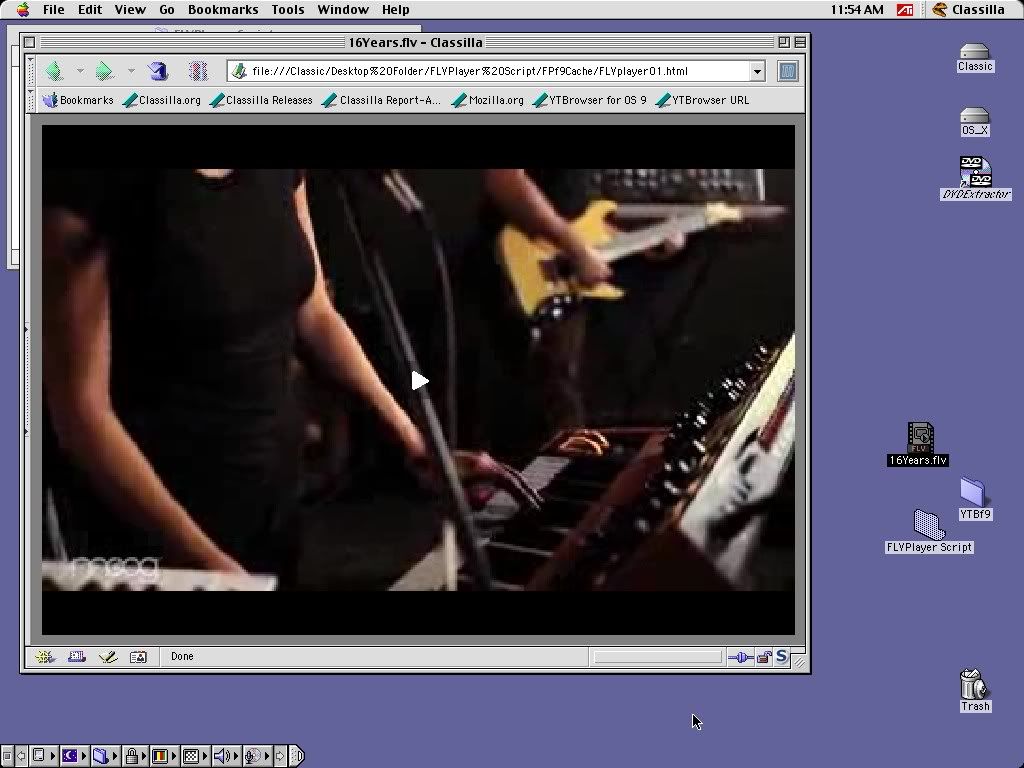
One final note, I notice the most recent version of Classilla defaults to a site's mobile page by setting its user agent to a Nokia mobile device. Really cool move. Makes Youtube and other sites zip. Though you can change it back to "normal" on a site-by-site basis via cookies, or globally by changing the user agent.
UPDATE: It looks like YTBrowser9 is similar to MacTubes in that you have to downlaod a new version whenever Youtube changes something in their url protocol.
Subscribe to:
Posts (Atom)