Software products branded with our badge shown above identify applications which are too powerful to be sold on Apple's Mac® App Store℠.Siri? What do I do, Siri? This does not compute!
Such a program is fully featured and does not fall under the restrictions imposed on “Apps”. The design of the application is oriented at user-friendlyness and carefully weighs the demands of professional customers against the skills of home users who are not interested in technical details.
Friday, February 17, 2012
A Badge of Our Times
I found this via The Macintosh Garden forums. A German software company has branded their software with a badge, "Full software, not an App!" Quote from their website:

Monday, February 6, 2012
TOR on Tiger
(UPDATE: This post is outdated. Please see this post for more current information.)
Well, it's been an eventful last few weeks on the internet with the shutdown of Megaupload, as well as news that Twitter will censor tweets, the FBI is seeking social network monitoring software, and some university student may be extradited from the UK to the US for hosting links on his website.
With all this going on, I thought it might be a good time to try out TOR, the open source privacy software that anonymises your internet activity from prying governments or anyone else. You may have already heard of it as a way to get around the Great Firewall of China. The bad news for us PowerPC users is the browser bundle TOR offers, a specialized version of Firefox bundled with other utilities that you just start up and run, is Intel only. The good news is they offer a "Vidalia Bundle" without the browser (you configure your preexisting browser) that works on PPC and Tiger here. If you're insane you can also compile it.
Vidalia is the name of the GUI utility to set up TOR on your computer, and it's pretty straightforward. The only glitch I saw was there's no dock icon like they said there'd be, only a menubar icon. Maybe a Tiger bug. The only difficult thing in setup was knowing which proxy settings to change in your web browser,but thankfully that task was taken up by the suitably named SimpleHelp.net with the simplest and easiest explanation you'll ever find (pictures, too!).-->OUTDATED: go here instead. You can also look here to find instructions on how to set your proxy system wide. Then it's a matter of going to their test page (alternate test page here) and seeing if you're now anonymous.
I thought performance was pretty good. I'd heard the TOR network was slow as a snail, but that wasn't my experience. Web surfing was a little sluggish, but not too much. Now, it's important to note here that the TOR network does have its limitations. It wasn't made for filesharing, so using it to download torrents is considered a douche move that only slows the network for others. If you want to download TV shows or whatever anonymously, use torrents with a VPN or get a usenet account with SSL support, but let's leave TOR to non-filesharing activities like leaking sensitive documents, mmkay?
On a semi-related note, there's a program out in the wild called Reaver that uses a WPS vulnerability in your wireless router to snatch your WPA and WPA2 passwords. This is not a privacy enhancing program. The solution is to disable WPS in your router, but on many if not all Linksys and Cisco routers, you can't do it. And Netgear users report problems, too. So ultimately you'll have to replace your manufacturer's firmware with open source firmware like DD-WRT which doesn't support WPS.
That was mildly depressing.
UPDATE: TOR developers have reported a previously unknown security vulnerability that could expose your IP address if you use websocket connections in Firefox. They've updated their browser bundles with a bugfix, but not the Vidalia bundle for PPC. I couldn't figure out if the bug applies to just the browser bundle users or to all others who are using external browsers (puzzlingly, TOR has no support forums), so I guess the safest thing is to disable websockets in TenFourFox by changing
Well, it's been an eventful last few weeks on the internet with the shutdown of Megaupload, as well as news that Twitter will censor tweets, the FBI is seeking social network monitoring software, and some university student may be extradited from the UK to the US for hosting links on his website.
With all this going on, I thought it might be a good time to try out TOR, the open source privacy software that anonymises your internet activity from prying governments or anyone else. You may have already heard of it as a way to get around the Great Firewall of China. The bad news for us PowerPC users is the browser bundle TOR offers, a specialized version of Firefox bundled with other utilities that you just start up and run, is Intel only. The good news is they offer a "Vidalia Bundle" without the browser (you configure your preexisting browser) that works on PPC and Tiger here. If you're insane you can also compile it.
Vidalia is the name of the GUI utility to set up TOR on your computer, and it's pretty straightforward. The only glitch I saw was there's no dock icon like they said there'd be, only a menubar icon. Maybe a Tiger bug. The only difficult thing in setup was knowing which proxy settings to change in your web browser,
I thought performance was pretty good. I'd heard the TOR network was slow as a snail, but that wasn't my experience. Web surfing was a little sluggish, but not too much. Now, it's important to note here that the TOR network does have its limitations. It wasn't made for filesharing, so using it to download torrents is considered a douche move that only slows the network for others. If you want to download TV shows or whatever anonymously, use torrents with a VPN or get a usenet account with SSL support, but let's leave TOR to non-filesharing activities like leaking sensitive documents, mmkay?
On a semi-related note, there's a program out in the wild called Reaver that uses a WPS vulnerability in your wireless router to snatch your WPA and WPA2 passwords. This is not a privacy enhancing program. The solution is to disable WPS in your router, but on many if not all Linksys and Cisco routers, you can't do it. And Netgear users report problems, too. So ultimately you'll have to replace your manufacturer's firmware with open source firmware like DD-WRT which doesn't support WPS.
That was mildly depressing.
UPDATE: TOR developers have reported a previously unknown security vulnerability that could expose your IP address if you use websocket connections in Firefox. They've updated their browser bundles with a bugfix, but not the Vidalia bundle for PPC. I couldn't figure out if the bug applies to just the browser bundle users or to all others who are using external browsers (puzzlingly, TOR has no support forums), so I guess the safest thing is to disable websockets in TenFourFox by changing
network.websocket.enabled to false in about:config and restarting TenFourFox.
Sunday, January 22, 2012
Viewing Youtube in Mac OS 9
As long as we're talking about OS 9, Dr. Dave alerted me to a couple of Japanese-authored apps for viewing Youtube and flv files in 9.2.2 (I didn't test these in earlier systems). The instructions and interface are written in Japanese, so it's a little confusing if you don't speak it, but I managed to more or less work it out.
They're called YTBrowser9 and FLVPlayer9. You also need a Flash browser plug-in, the one I tested with was version 7.
For YTBrowser9, after downloading and unpacking double click on it and it'll ask which browser you're using. Since I'm using Classilla, I clicked on Mozilla. Then, when you click through a couple of other boxes in Japanese and click cancel when it asks you to enter a Youtube url, Classilla should open up a welcome screen, again in Japanese. Find a link on that page that goes to an index file. Once you've found the index, you should see a red bar at the top with links to search, preferences, history, and a few others. Click on search, enter a search phrase, and then once you see a video you want to watch, copy its link, then navigate back to the index and click "?? URL" (its full url is "ytbb://www.youtube.com/dialog") and paste your link. Then you should see something like this:

Notice the download button. You need javascript enabled to use it with "Save Link Target As..." for downloading.
To make YTBrowser9 easier to use, I added bookmarks for the search and enter URL links. I'm not sure if this is exactly how you're supposed to use it, but that happens when your Japanese is as rusty as mine, har.
As for FLVPlayer9, it apears to be a simple drag and drop application. Just take a saved FLV file and drop it over the app, then it'll open it in a web browser window.

One final note, I notice the most recent version of Classilla defaults to a site's mobile page by setting its user agent to a Nokia mobile device. Really cool move. Makes Youtube and other sites zip. Though you can change it back to "normal" on a site-by-site basis via cookies, or globally by changing the user agent.
UPDATE: It looks like YTBrowser9 is similar to MacTubes in that you have to downlaod a new version whenever Youtube changes something in their url protocol.
They're called YTBrowser9 and FLVPlayer9. You also need a Flash browser plug-in, the one I tested with was version 7.
For YTBrowser9, after downloading and unpacking double click on it and it'll ask which browser you're using. Since I'm using Classilla, I clicked on Mozilla. Then, when you click through a couple of other boxes in Japanese and click cancel when it asks you to enter a Youtube url, Classilla should open up a welcome screen, again in Japanese. Find a link on that page that goes to an index file. Once you've found the index, you should see a red bar at the top with links to search, preferences, history, and a few others. Click on search, enter a search phrase, and then once you see a video you want to watch, copy its link, then navigate back to the index and click "?? URL" (its full url is "ytbb://www.youtube.com/dialog") and paste your link. Then you should see something like this:

Notice the download button. You need javascript enabled to use it with "Save Link Target As..." for downloading.
To make YTBrowser9 easier to use, I added bookmarks for the search and enter URL links. I'm not sure if this is exactly how you're supposed to use it, but that happens when your Japanese is as rusty as mine, har.
As for FLVPlayer9, it apears to be a simple drag and drop application. Just take a saved FLV file and drop it over the app, then it'll open it in a web browser window.
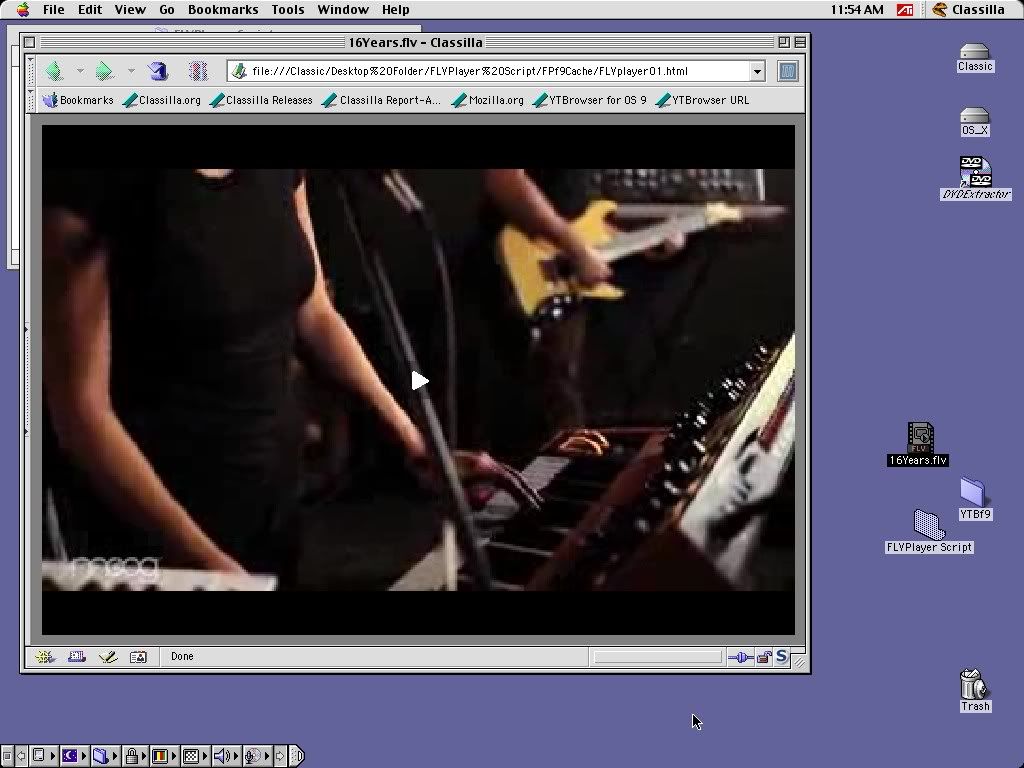
One final note, I notice the most recent version of Classilla defaults to a site's mobile page by setting its user agent to a Nokia mobile device. Really cool move. Makes Youtube and other sites zip. Though you can change it back to "normal" on a site-by-site basis via cookies, or globally by changing the user agent.
UPDATE: It looks like YTBrowser9 is similar to MacTubes in that you have to downlaod a new version whenever Youtube changes something in their url protocol.
Wednesday, January 18, 2012
Copy a Bootable Mac OS 9 Install Disc
So with the recent turning of the calendar, I looked at my Tiger and OS 9 install discs and it occurred to me they're getting on in years and very far from invincible. Time to make backups, I thought. So I fired up my burning app of choice, Burn.app, and made quick copies thinking I was done. Unfortunately I got a nasty surprise when I went to boot my iBook with the OS 9 copy to fix Debian's notorious disappearing partitions bug and found it unbootable. The Tiger DVD copy booted fine. It was only the OS 9 CD that was blurgged.
Okay, I thought, there's something wrong with the way Burn copies OS 9 discs. I'll just fire up Disk Utility and do it that way. One burned disc later and, crap, that won't boot either. So after googling this a bit and filtering out forum posts responding to questions saying, "Google it!" it appears the only way to burn a bootable OS 9 disc is with Toast. I tried it with my ancient copy of Toast 4.1.1 (that was a good year) which still runs in 9.2.2 and can confirm it works. The procedure is simple. It just takes a quick read through of the documentation to get it. I did not investigate whether you can do this with an OS X copy of Toast.
I'm still a bit clueless as to why the earlier copies were unbootable. They both had the correct file systems and had the hidden Trash and Desktop Folders. So I don't know.
This vexes me. I'm terribly vexed.
Okay, I thought, there's something wrong with the way Burn copies OS 9 discs. I'll just fire up Disk Utility and do it that way. One burned disc later and, crap, that won't boot either. So after googling this a bit and filtering out forum posts responding to questions saying, "Google it!" it appears the only way to burn a bootable OS 9 disc is with Toast. I tried it with my ancient copy of Toast 4.1.1 (that was a good year) which still runs in 9.2.2 and can confirm it works. The procedure is simple. It just takes a quick read through of the documentation to get it. I did not investigate whether you can do this with an OS X copy of Toast.
I'm still a bit clueless as to why the earlier copies were unbootable. They both had the correct file systems and had the hidden Trash and Desktop Folders. So I don't know.
This vexes me. I'm terribly vexed.
Wednesday, January 11, 2012
Note to Forum Posters
Dear Forum Posters,
When you respond to someone's support question by telling them to google it, my google searches end up at your posts. Please stop.
Sincerely,
Dan at ppcluddite.blogspot.com
When you respond to someone's support question by telling them to google it, my google searches end up at your posts. Please stop.
Sincerely,
Dan at ppcluddite.blogspot.com
Thursday, December 29, 2011
Posting Binaries on Usenet
I've written about Usenet before, as in downloading off Usenet, but I've never gotten around to posting binaries or feeling a need to. Until now. I saw a request for an old movie that I had as an ancient VHS rip, and the request looked so lonely I just had to fill it. But how? I never posted to Usenet before, so I fired up MT-Newswatcher X and thought it would be a simple process. Instead I found a deal-breaker. First, it doesn't encode files in yenc. Annoying, but not a death blow. But then I found out it doesn't post filenames longer than 31 characters. Hold on. Now I like Mac OS 9 just as much as the next person, but do we really want to go back there? No, no, no. There has to be another option.
So I went looking, and there aren't a ton of choices for OS X. There's Unison by Panic, Inc. (Panic, huh? As in kernel panic? Oh, wait, that's Unsanity). There's also Thoth by living legend Brian Clark. Both of these are shareware, and there's also a shareware utility called Cocoa Newspost whose developer website is missing, so support may have ended.
I also looked at the possibility of using Pan on OS X, but while deciding to steer clear of that PITA, I learned about a command line utility called Newspost. A command line utility? No simple GUI, having to learn complex text commands, having to compile it yourself? Baby, you're a black hole and I'm a nice plump juicy class G star!
Newspost's website calls it a "usenet binary autoposter for Unix," but there is no statement it runs on OS X. However, OS X is Unix, so why not compile it and try it, right? Well, what do ya know, it worked! All it took was a simple
There are basically two commands you need to enter. First, setting your defaults (just once), and second, the command to post (for each time you post). Setting your defaults is the stunningly complicated and labor intensive task of typing this:
Replace
Next it's time to post something, probably to
Posting multiple files can be done like this:
or:
The "
And that's pretty much it. The man page and this how-to pretty much tell you all you need. So happy posting! Just don't break Usenet.
So I went looking, and there aren't a ton of choices for OS X. There's Unison by Panic, Inc. (Panic, huh? As in kernel panic? Oh, wait, that's Unsanity). There's also Thoth by living legend Brian Clark. Both of these are shareware, and there's also a shareware utility called Cocoa Newspost whose developer website is missing, so support may have ended.
I also looked at the possibility of using Pan on OS X, but while deciding to steer clear of that PITA, I learned about a command line utility called Newspost. A command line utility? No simple GUI, having to learn complex text commands, having to compile it yourself? Baby, you're a black hole and I'm a nice plump juicy class G star!
Newspost's website calls it a "usenet binary autoposter for Unix," but there is no statement it runs on OS X. However, OS X is Unix, so why not compile it and try it, right? Well, what do ya know, it worked! All it took was a simple
make && make install, no configure script necessary. The only glitch was man newspost returned No manual entry for newspost. Don't know why that is since it's in /usr/local. Oh well, the man page is here on the internet, too. Now let's get on to using it!There are basically two commands you need to enter. First, setting your defaults (just once), and second, the command to post (for each time you post). Setting your defaults is the stunningly complicated and labor intensive task of typing this:
newspost -f emailaddress -F personality -o organization -i newsserver -u username -p password -z 119 -dReplace
emailaddress with the email you want other users to see, personality with the name you want other users to see (enclose it in quotes if it has a space), organization with your organization, newsserver with your Usenet news server address, username with your Usenet account username, password with your password (please make it more complex than "password"). The port number is always 119, and the trailing -d says to make these defaults.Next it's time to post something, probably to
alt.binaries.test for starters. If you're posting a single file, this will require the stunningly complicated and labor intensive task of typing this:newspost -s "subject of your post" -n alt.binaries.test -y /path/to/filePosting multiple files can be done like this:
cd to /directory/of/files

newspost -s "subject of your post" -n alt.binaries.test -y filename*
or:
newspost -s "subject of your post" -n alt.binaries.test -y *.mp4The "
filename*" means you're posting all the files in that folder with the same filename but with different extensions (like a split mp4 with a bunch of pars and an nfo). The "*mp4" means posting every file in that folder with an mp4 extension.And that's pretty much it. The man page and this how-to pretty much tell you all you need. So happy posting! Just don't break Usenet.
Sunday, December 18, 2011
TenFourFox 9 is Out!
Well, a release candidate, anyway. But it's the debut of methodjit which will come to our rescue now that tracejit is going the way of the dodo, and as a result our javascript scores won't take a massively negative hit. All the details are blogged by Cameron Kaiser, the lead developer, here (download link included), so go read for the compiler pr0n. But I can report to you my Dromaeo scores are about ten percent faster from version 8 to 9 on my ancient Sawtooth, and Sunspider shows a 25 percent improvement. Not bad work;)
UPDATE: The Blogger problem is a Firefox problem, not just TenFourFox.
On the GUI side, the only difference I see is a de-coloring of the stop/reload button. It used to be red/blue, but now it just blends with the white of the menubar. I've seen just one rendering problem, unfortunately with Blogger's Dashboard interface, so I'm writing this post in Safari. I could just try clicking the "Try the updated Blogger interface" link that's been staring at me for several months now, but that wouldn't be living up to my namesake. I think I'll deploy a corollary of my tried-and-true life strategy Ignore It Until It Goes Away. In this case, I'll Wait It Out Until It Comes Back. I'm sure it'll work.
UPDATE: The Blogger problem is a Firefox problem, not just TenFourFox.
Subscribe to:
Posts (Atom)