Peter S. emailed me a Youtube link that I found somewhat interesting.
Linux.Extra - ArchLinuxPPC and XFCE switch Ep/1
Basically this person's suggesting he's going to start an ArchLinux port for PowerPC, sort of take over the project from where it was abandoned a couple of years ago. I don't know if this will come to fruition as it's a ton of work, but the author has been posting videos regularly so we'll see.
In the meantime, if you want a rolling release, which is what ArchLinux is (a release where the latest packages are updated as they come in), you can run Debian Sid and also pick packages from the experimental branch. You may be able to do something similar on Ubuntu, but I'm not sure. The thing about a rolling release, though, is that things can break. There isn't a lot of testing done before packages are allowed into the repository, and this is why rolling releases are geared to the more adventurous. But I've never used Arch, so it would be interesting to see the stability of their bleeding-edgeness vs. that of a traditional release-based distribution.
In other news, there's been some chatter on Linux blogs lately about Ubuntu's future plans (Mir, release schedules) and how they might affect the Xubuntu and Lubuntus of the world. There's thus far baseless speculation that the other flavors might jump ship and base themselves on Debian or some other distribution, but on the Lubuntu mailing list Lubuntu's lead developer withheld their opinion but said they'd have more to say when work is done on the current development release. So stay tuned.
I wonder how long Canonical can keep up its secrecy and arbitrary decision-making before people decide it's not a community worth contributing to anymore.
Thursday, March 21, 2013

Monday, March 11, 2013
iOS 7 Leaked
Don't ask me how I got this (I don't want to be responsible for any drone strikes), but I have a prototype of Apple's upcoming iOS 7. This has been hotly anticipated, partly because people were getting fed up with the staleness of iOS 6, and also this is our first chance to see Jony Ive's fingerprints since he took over as head of design.

Gone is the schizophrenic skeuomorphic implementation of previous releases in favor of a much simpler, more unified design. Instead of switching from metal to leather to blue jeans, your eyes will be now be focused on one texture, with all icons and graphics following the same graphical framework. But that's just the visual. The real innovation here is with two brand new technologies called "MultiFinder" and "Hypercard."
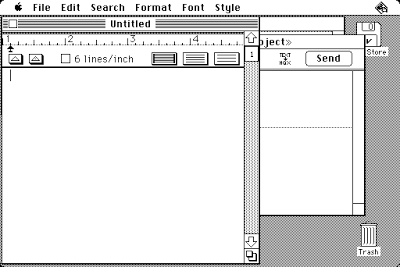
MultiFinder, simply put, brings the new ability to run apps side by side in an interactive manner. I almost don't know what to say about this. It's so new I think we'll need some time to process all the implications. It's one thing to have apps, but to have multiple apps working together at the same time? My head is officially blown.
Hypercard is something I haven't had time to get much into yet, but it's supposedly an intuitive programming interface that will allow any ordinary Joe or Josephine to produce their own apps, no programming language necessary. This is nothing less than the democratization of software development and could be a revolution in how we interact with our devices. One can even imagine people eschewing current media models and producing their own communication networks. Imagine if we had something like this twenty-five years ago. The World Wide Web would be a far different place.
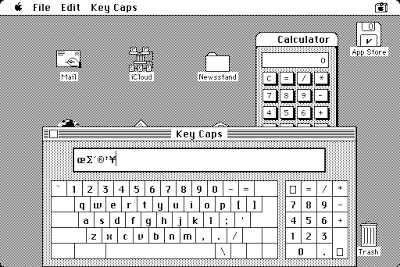
Other additions are a built-in calculator (finally!) and something that makes my fingers particularly happy, an extended keyboard. I should apologize for not going more in depth, but I just got this and I'm literally trembling with the adrenaline rush as I write it. Hopefully I'll have more, though I'm sure Gizmodo will chime in. They're never far behind on this stuff. But, yeah, the world's changing. Thank you, Apple. Just thank you.

Gone is the schizophrenic skeuomorphic implementation of previous releases in favor of a much simpler, more unified design. Instead of switching from metal to leather to blue jeans, your eyes will be now be focused on one texture, with all icons and graphics following the same graphical framework. But that's just the visual. The real innovation here is with two brand new technologies called "MultiFinder" and "Hypercard."

MultiFinder, simply put, brings the new ability to run apps side by side in an interactive manner. I almost don't know what to say about this. It's so new I think we'll need some time to process all the implications. It's one thing to have apps, but to have multiple apps working together at the same time? My head is officially blown.
Hypercard is something I haven't had time to get much into yet, but it's supposedly an intuitive programming interface that will allow any ordinary Joe or Josephine to produce their own apps, no programming language necessary. This is nothing less than the democratization of software development and could be a revolution in how we interact with our devices. One can even imagine people eschewing current media models and producing their own communication networks. Imagine if we had something like this twenty-five years ago. The World Wide Web would be a far different place.

Other additions are a built-in calculator (finally!) and something that makes my fingers particularly happy, an extended keyboard. I should apologize for not going more in depth, but I just got this and I'm literally trembling with the adrenaline rush as I write it. Hopefully I'll have more, though I'm sure Gizmodo will chime in. They're never far behind on this stuff. But, yeah, the world's changing. Thank you, Apple. Just thank you.
Saturday, March 9, 2013
MintPPC 11 vs. Lubuntu 13.04 Shootout Deathmatch!
Not really. I told you earlier I installed MintPPC alongside Lubuntu on my Sawtooth, and since I wrote up a review of Lubuntu I thought I'd do the same for Mint. Minus the bloodletting.
Here's what you get with MintPPC: an easy install process, a good variety of low resource applications, and an LXDE desktop all set up and ready to go. Based on Debian Wheezy and Mint 11 (Katya), it's designed specifically for PowerPC Macs and is as painless to install as any distro. This being Linux, though, there are issues. This being Linux, though, there are also workarounds. I'll get to those in a minute, but first the positives.
Minitube is back! It's been long broken on Debian and was removed from the Wheezy repositories, but it's here and working flawlessly. Also, video performance in general is excellent. VLC and Gnome Mplayer work out of the box, and Gnome Mplayer in particular plays DVDs very smoothly. G3 users will need a specially compiled Mplayer and VLC available in this thread. Otherwise they'll crash without altivec. Or you can compile your own for the fun of it;)
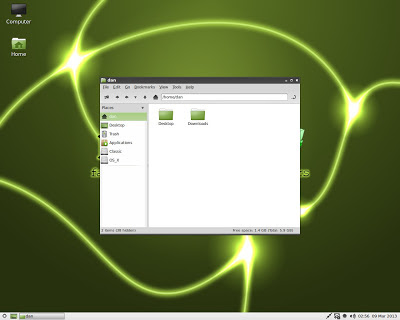
As you can see from the screenshot above, MintPPC comes with PCManFM which also provides icons on the desktop. It automatically recognized my OS 9 and OS X partitions, but not my Lubuntu partition. For this I'll have to edit /etc/fstab. Performance is what you'd expect from an LXDE environment--fast. Plus the GUI is very sleek and minimal, more so than MintPPC 9.
About the GUI, though, there are some (fixable) problems. First, the now infamous invisible fonts problem is still here as of this writing, where black GTK fonts are invisible after installation. This is a Debian bug that is in the process of being fixed, but in the meantime I posted the workaround here. Also, the GTK2 theme breaks on GTK3 apps causing them to revert to the "default ugly" look. I guess MintPPC was put together in that awkward transition where GTK2 themes weren't yet updated to deal with GTK3 apps, but you can install the GTK2/GTK3 theme Mint-Z Improved, which is almost identical to Mint-X Metal (the default). The only hiccup was the task bar now displays the text white, but that's fixed by right clicking on the task bar, choosing "Task Bar (Window List) Settings" and checking the "Flat buttons" box. The two screenshots below show the GTK3 apps Gedit and Totem Movie Player, first under Mint-X Metal and the second with the compatible Mint-Z Improved.


If you want me to get really negative, I'll reserve that for "Software Manager." It's apparently designed for people who find Synaptic Package Manager too complicated, but if you've already installed Linux there is no way you will find Synaptic too complicated. Nevertheless, Software Manager is dumbed down to a toddler's level and also happens to be broken beyond belief. I would've liked to have seen it not included.
There are a couple of other default installs you'd do yourself a favor in switching out. Exaile is a music player that has been a massive fail for me on every system I've tried it on. Replacing it with Audacious would be a big upgrade. Also, XArchiver appears unmaintained and has a bug preventing it from unpacking .7z files. A good replacement is File-roller, though you'll probably want to install it with the --without-recommends option or it'll install a bunch of Gnome stuff with it.
A couple of other minor quibbles. No CD ripper? Am I the only one who still rips CDs? And an SSH server was not installed by default. If you're gonna have an SSH client by default, you might as well put the server software in, too.
I should also warn you about update-apt-xapian-index. It runs just after installation and, like Spotlight running for the first time, will drastically slow down your system especially if you don't have a lot of memory. You can look in this forum thread if you need to disable it. I just let it run and it finished after ten or fifteen minutes.
And one last note, Powerprefs, the pbbuttonsd configuration tool, must be run as root to save changes.
So what are you waiting for? Go grab an install CD and give it a whirl. There's a wealth of information in the MintPPC forums, just use the search, or ask a question if you can't find the answer.
UPDATE: I should add that my install came with pulseaudio, which can cause problems if you're trying to use a JACK audio server, among other things. So you might want to uninstall pulseaudio.
Here's what you get with MintPPC: an easy install process, a good variety of low resource applications, and an LXDE desktop all set up and ready to go. Based on Debian Wheezy and Mint 11 (Katya), it's designed specifically for PowerPC Macs and is as painless to install as any distro. This being Linux, though, there are issues. This being Linux, though, there are also workarounds. I'll get to those in a minute, but first the positives.
Minitube is back! It's been long broken on Debian and was removed from the Wheezy repositories, but it's here and working flawlessly. Also, video performance in general is excellent. VLC and Gnome Mplayer work out of the box, and Gnome Mplayer in particular plays DVDs very smoothly. G3 users will need a specially compiled Mplayer and VLC available in this thread. Otherwise they'll crash without altivec. Or you can compile your own for the fun of it;)

As you can see from the screenshot above, MintPPC comes with PCManFM which also provides icons on the desktop. It automatically recognized my OS 9 and OS X partitions, but not my Lubuntu partition. For this I'll have to edit /etc/fstab. Performance is what you'd expect from an LXDE environment--fast. Plus the GUI is very sleek and minimal, more so than MintPPC 9.
About the GUI, though, there are some (fixable) problems. First, the now infamous invisible fonts problem is still here as of this writing, where black GTK fonts are invisible after installation. This is a Debian bug that is in the process of being fixed, but in the meantime I posted the workaround here. Also, the GTK2 theme breaks on GTK3 apps causing them to revert to the "default ugly" look. I guess MintPPC was put together in that awkward transition where GTK2 themes weren't yet updated to deal with GTK3 apps, but you can install the GTK2/GTK3 theme Mint-Z Improved, which is almost identical to Mint-X Metal (the default). The only hiccup was the task bar now displays the text white, but that's fixed by right clicking on the task bar, choosing "Task Bar (Window List) Settings" and checking the "Flat buttons" box. The two screenshots below show the GTK3 apps Gedit and Totem Movie Player, first under Mint-X Metal and the second with the compatible Mint-Z Improved.


If you want me to get really negative, I'll reserve that for "Software Manager." It's apparently designed for people who find Synaptic Package Manager too complicated, but if you've already installed Linux there is no way you will find Synaptic too complicated. Nevertheless, Software Manager is dumbed down to a toddler's level and also happens to be broken beyond belief. I would've liked to have seen it not included.
There are a couple of other default installs you'd do yourself a favor in switching out. Exaile is a music player that has been a massive fail for me on every system I've tried it on. Replacing it with Audacious would be a big upgrade. Also, XArchiver appears unmaintained and has a bug preventing it from unpacking .7z files. A good replacement is File-roller, though you'll probably want to install it with the --without-recommends option or it'll install a bunch of Gnome stuff with it.
A couple of other minor quibbles. No CD ripper? Am I the only one who still rips CDs? And an SSH server was not installed by default. If you're gonna have an SSH client by default, you might as well put the server software in, too.
I should also warn you about update-apt-xapian-index. It runs just after installation and, like Spotlight running for the first time, will drastically slow down your system especially if you don't have a lot of memory. You can look in this forum thread if you need to disable it. I just let it run and it finished after ten or fifteen minutes.
And one last note, Powerprefs, the pbbuttonsd configuration tool, must be run as root to save changes.
So what are you waiting for? Go grab an install CD and give it a whirl. There's a wealth of information in the MintPPC forums, just use the search, or ask a question if you can't find the answer.
UPDATE: I should add that my install came with pulseaudio, which can cause problems if you're trying to use a JACK audio server, among other things. So you might want to uninstall pulseaudio.
Thursday, February 28, 2013
Lubuntu 13.04 Raring Ringtail PowerPC Preview
I mentioned earlier I installed Lubuntu 13.04 and MintPPC on a second hard drive in my Sawtooth, so I thought I'd give you a quick look-see on the former to see what it's all about.
On first impression, it's highly polished. The theme is unified across all applications and the fonts are handsome. I'm not personally a fan of the Ubuntu font, but that just means 99% of the rest of the world looooooves it. The LXDE environment is easy to navigate around and very responsive, the same as LXDE on any other distro. It comes with a very minimal set of basic applications, which I appreciate. Just one music player (Audacious), one video player (Gnome Mplayer), one web browser (Firefox 19), etc. PCManFM automatically detected and mounted all partitions on both discs. Overall I was pleasantly surprised, though this being a development release there were some instances of bugginess.
First, I had to use the yaboot parameter "Linux video=radeonfb:1280x1024-32@60" entered at the second yaboot prompt. Otherwise I got distorted colors. Also, by using video=radeonfb:off, I could get 3D acceleration but only briefly. After a few minutes the system always froze, and it was due to radeon errors. I filed a bug report here and it's setting the world on fire as you can see.
Probably the biggest disappointment is with video. With 3D acceleration enabled, video playback is great, but like I said, 3D for me is unreliable. Back in a 2D desktop, videos show about 30% higher CPU usage and I get a slight horizontal shearing effect--slight but noticeable. I've never seen this problem on Debian/MintPPC. Also, when trying VLC it played sound but no video.
The only other bug I found was the Firefox blue tint bug, where some resized images are tinted blue. This is a PowerPC specific bug and has been patched at Mozilla's end, so it's only a matter of time before the fix migrates down to Ubuntu and Debian. In the meantime, Zen at PowerPC Liberation detailed a simple workaround here.
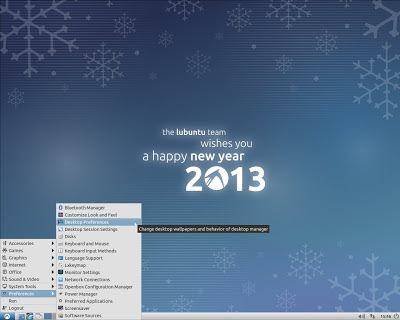
Here are a few screenshots, the third showing the Firefox bug:
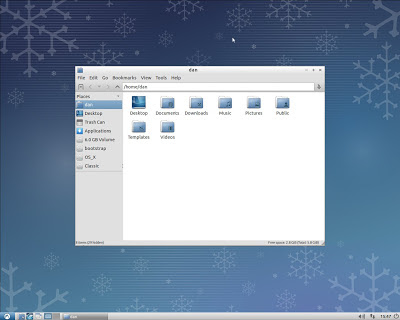

Go ahead, give Raring a spin. I recommend installing from the alternate CD instead of the live CD, because it fits on an actual CD and you don't have to worry about messing with yaboot parameters and xorg settings to get the graphical one to work. Actually I've had highly prejudicial experiences with live CDs in the past, so take that for what it's worth.
Some more useful reading here: Lubuntu 13.04 (Raring Ringtail) daily build
On first impression, it's highly polished. The theme is unified across all applications and the fonts are handsome. I'm not personally a fan of the Ubuntu font, but that just means 99% of the rest of the world looooooves it. The LXDE environment is easy to navigate around and very responsive, the same as LXDE on any other distro. It comes with a very minimal set of basic applications, which I appreciate. Just one music player (Audacious), one video player (Gnome Mplayer), one web browser (Firefox 19), etc. PCManFM automatically detected and mounted all partitions on both discs. Overall I was pleasantly surprised, though this being a development release there were some instances of bugginess.
First, I had to use the yaboot parameter "Linux video=radeonfb:1280x1024-32@60" entered at the second yaboot prompt. Otherwise I got distorted colors. Also, by using video=radeonfb:off, I could get 3D acceleration but only briefly. After a few minutes the system always froze, and it was due to radeon errors. I filed a bug report here and it's setting the world on fire as you can see.
Probably the biggest disappointment is with video. With 3D acceleration enabled, video playback is great, but like I said, 3D for me is unreliable. Back in a 2D desktop, videos show about 30% higher CPU usage and I get a slight horizontal shearing effect--slight but noticeable. I've never seen this problem on Debian/MintPPC. Also, when trying VLC it played sound but no video.
The only other bug I found was the Firefox blue tint bug, where some resized images are tinted blue. This is a PowerPC specific bug and has been patched at Mozilla's end, so it's only a matter of time before the fix migrates down to Ubuntu and Debian. In the meantime, Zen at PowerPC Liberation detailed a simple workaround here.
Here are a few screenshots, the third showing the Firefox bug:


Go ahead, give Raring a spin. I recommend installing from the alternate CD instead of the live CD, because it fits on an actual CD and you don't have to worry about messing with yaboot parameters and xorg settings to get the graphical one to work. Actually I've had highly prejudicial experiences with live CDs in the past, so take that for what it's worth.
Some more useful reading here: Lubuntu 13.04 (Raring Ringtail) daily build
Thursday, February 21, 2013
Streaming Music on PowerPC
I have a confession to make. I'm a 120 Minutes orphan. Once upon a time there was a show every Sunday at midnight on MTV where you'd get two hours of videos of everything alternative and cutting edge. It was called 120 Minutes, and with this show you didn't need anything else to tell you what new music was out there. It was all packed into 120 minutes every week. And then it got cancelled.
Turns out I became dependent and was woefully unprepared to face the world without it. Finding new music was like suddenly being lost in an alien landscape of Myspace, Youtube, and low wattage college radio stations. I eventually turned to the humiliating method of typing in a CD I liked on Amazon and then going to the "Customers who purchased this also bought..." section. But even that's shown diminishing returns. Thankfully there's been a bevy of streaming music services to appear in recent years, not just internet radio stations, but services to read your tastes and serve up music you may have more than a 1% chance of not actively hating. So I thought I'd give a rundown of these for PowerPC Macs and see which are still compatible.
Spotify
First up is Spotify. It's client-based, meaning you download a client to login with and it serves up music with iTunes integration, its own playlists, as well as ads if you're on a free account. Version 0.6.6.10 is the last one to support Tiger and PowerPC and it still works, though there's no guarantee it will in the future. The charms of unsupported software. It can be found on this page.
Spotify also has a beta web client that is only accessible by signing in with your Facebook account. I'm not on Facebook so I didn't bother trying it, but you can here. Another option for paid members is Despotify, a cli-based client that can be installed on Linux, and on Macs with Homebrew.
Spotify has a beta Linux client, but the bastard sharks didn't compile it for PowerPC.
Last.fm
(UPDATE: Thanks to Mike W. for leaving a link in comments to the last PowerPC version of Last.fm's official OS X client. It's old but it still works. How did I miss this?)
Last.fm plays in your web browser and requires flash. This definitely sucks. I searched around for standalone clients on OS X, but they're all old and no longer work.
Thankfully the picture is brighter on Linux. There's a great open source client called lastfm available in the Debian repositories, and it has all the features of the web player without the flash. There's also the console-based shell-fm, and it may also be possible to compile this on OS X, though it looked...involved.
In addition to standalones, there are many applications that have Last.fm plugins to scrobble what you're playing back to the death star.
Pandora
Pandora is similar to Last.fm in that it basically gives you customized radio stations based on your likes and dislikes. Their web player recently changed to html5, but inexplicably still requires flash. This definitely sucks. They have an official desktop client that requires Adobe Air (scroll waaaaaay down for the last PowerPC version) and is for paid subscribers only.
This is another service where the much better experience is with Linux. Namely Pithos, a standalone GTK client that's tiny and slick. If for some reason you prefer a console-based client, there's Pianobar.
(UPDATE: If you see songs loading as 42 seconds long and playing silently, that's not a problem with your client. It's something Pandora triggers from the server side when you skip too many songs for their liking.)
Grooveshark
Last of the big players is Grooveshark. They appear to be exlusively web-based with no standalone clients. Their regular website requires flash, but they also have an html5 site that works in Safari/Webkit/TenFourKit. As of now it won't work in Firefox/TenFourFox because Grooveshark uses a proprietary codec that Mozilla is not supporting. Depending on your ideologies, blame Grooveshark or Mozilla.
In addition to those four services, there are a few others like Slacker Radio, Jango, and Rdio. They all require flash, though Rdio has made an old client for PowerPC Leopard users available here (direct download).
I also tried to get the flash sites working on Linux with Gnash and Lightspark, which was a hopeless exercise in futility. Of all these solutions, my favorite is the Linux Last.fm client, though it's a qt app. Here's a quick tip. If you have a qt app like SMPlayer or lastfm that has the ugly Windows 95 look and isn't conforming to your GTK theme, install qt4-qtconfig* and use that to get your qt apps to match. And its launch command is qtconfig or also qtconfig-qt4.
With all the above services, there's also an ethical consideration to make. They're fine as a musical discovery tool, but be aware they pay artists very little if anything in royalties, despite all the revenues they take in. So it's kind of a crap move to find something you like and then use the service to play it back on demand. If you like a song, support the artist and buy their stuff!
*You'll also need to install libgnome2-common, see this bug report for the why.
Turns out I became dependent and was woefully unprepared to face the world without it. Finding new music was like suddenly being lost in an alien landscape of Myspace, Youtube, and low wattage college radio stations. I eventually turned to the humiliating method of typing in a CD I liked on Amazon and then going to the "Customers who purchased this also bought..." section. But even that's shown diminishing returns. Thankfully there's been a bevy of streaming music services to appear in recent years, not just internet radio stations, but services to read your tastes and serve up music you may have more than a 1% chance of not actively hating. So I thought I'd give a rundown of these for PowerPC Macs and see which are still compatible.
Spotify
First up is Spotify. It's client-based, meaning you download a client to login with and it serves up music with iTunes integration, its own playlists, as well as ads if you're on a free account. Version 0.6.6.10 is the last one to support Tiger and PowerPC and it still works, though there's no guarantee it will in the future. The charms of unsupported software. It can be found on this page.
Spotify also has a beta web client that is only accessible by signing in with your Facebook account. I'm not on Facebook so I didn't bother trying it, but you can here. Another option for paid members is Despotify, a cli-based client that can be installed on Linux, and on Macs with Homebrew.
Spotify has a beta Linux client, but the bastard sharks didn't compile it for PowerPC.
Last.fm
(UPDATE: Thanks to Mike W. for leaving a link in comments to the last PowerPC version of Last.fm's official OS X client. It's old but it still works. How did I miss this?)
Last.fm plays in your web browser and requires flash. This definitely sucks. I searched around for standalone clients on OS X, but they're all old and no longer work.
Thankfully the picture is brighter on Linux. There's a great open source client called lastfm available in the Debian repositories, and it has all the features of the web player without the flash. There's also the console-based shell-fm, and it may also be possible to compile this on OS X, though it looked...involved.
In addition to standalones, there are many applications that have Last.fm plugins to scrobble what you're playing back to the death star.
Pandora
Pandora is similar to Last.fm in that it basically gives you customized radio stations based on your likes and dislikes. Their web player recently changed to html5, but inexplicably still requires flash. This definitely sucks. They have an official desktop client that requires Adobe Air (scroll waaaaaay down for the last PowerPC version) and is for paid subscribers only.
This is another service where the much better experience is with Linux. Namely Pithos, a standalone GTK client that's tiny and slick. If for some reason you prefer a console-based client, there's Pianobar.
(UPDATE: If you see songs loading as 42 seconds long and playing silently, that's not a problem with your client. It's something Pandora triggers from the server side when you skip too many songs for their liking.)
Grooveshark
Last of the big players is Grooveshark. They appear to be exlusively web-based with no standalone clients. Their regular website requires flash, but they also have an html5 site that works in Safari/Webkit/TenFourKit. As of now it won't work in Firefox/TenFourFox because Grooveshark uses a proprietary codec that Mozilla is not supporting. Depending on your ideologies, blame Grooveshark or Mozilla.
In addition to those four services, there are a few others like Slacker Radio, Jango, and Rdio. They all require flash, though Rdio has made an old client for PowerPC Leopard users available here (direct download).
I also tried to get the flash sites working on Linux with Gnash and Lightspark, which was a hopeless exercise in futility. Of all these solutions, my favorite is the Linux Last.fm client, though it's a qt app. Here's a quick tip. If you have a qt app like SMPlayer or lastfm that has the ugly Windows 95 look and isn't conforming to your GTK theme, install qt4-qtconfig* and use that to get your qt apps to match. And its launch command is qtconfig or also qtconfig-qt4.
With all the above services, there's also an ethical consideration to make. They're fine as a musical discovery tool, but be aware they pay artists very little if anything in royalties, despite all the revenues they take in. So it's kind of a crap move to find something you like and then use the service to play it back on demand. If you like a song, support the artist and buy their stuff!
*You'll also need to install libgnome2-common, see this bug report for the why.
Monday, February 18, 2013

Saturday, February 9, 2013
Global Equalizer for OS X
It's pretty late in the game to have discovered this, maybe I read somewhere before that it wasn't possible, but it turns out there's a way to have a global equalizer across all your applications in OS X. Not just in iTune$ or VLC or others with their own equalizers built in, but in everything else like Youtube videos in your browser or games and such.
One reason I want this is because all my CDs are ripped in Ogg Vorbis format, and iTune$'s (okay, I'll stop with the dollar sign) equalizer doesn't play with the Xiph plugin that enables both .ogg and .flac playback. Kind of a bummer since my desktop speakers are a bit small and could benefit from some tweaking. Luckily there's a global solution.
You need two pieces of software: AU Lab and Soundflower. AU Lab is part of the Xcode Developer Tools that came on your install discs. You can also download Developer Tools from Apple's developer website (free registration required). They've recently made AU Lab available as a standalone download so you don't have to install the full GB+ developer package, but I think it's only for Snow Leopard and up. I'm not sure about the licensing of obtaining a standalone AU Lab for Tiger and Leopard (it's free, after all), but you may find it with a bit of googling. Soundflower, more simply, is available here (1.4.3 for PowerPC).
At first I tried following Dctr Watson's directions here, but they were Snow Leopard-centric and I failed miserably. After some searching I finally came across this old post which had AU Lab/Soundflower instructions for Tiger. And they worked!
Now onto setting the right levels. The two pics below are two views of the same levels, the second one displaying the actual numbers.
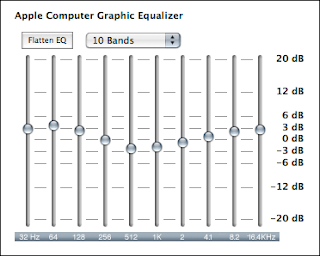

These are what work best for my speakers. They're not overly aggressive with the bass, but they expand the soundscape and make my speakers sound less mono. Makes a much richer sound. If you try these and get distortion, just lower the levels or narrow the curve.
Once you're satisfied, you can save the preset and also save an Au Lab .trak document that you can use as a login item in your Accounts Preferences. That way it's running on startup. If you don't want that, you can just launch the .trak document to activate the equalizer anytime you want.
As far as equalizers go, the CPU hit is slight. AU Lab will use maybe 5% of your processor (and a slight amount of RAM) while running, but the key is to hide the application. There's visual feedback in the application window when audio plays, so if you keep it visible you're gonna take more of a hit.
Now Youtube videos actually sound good.
One reason I want this is because all my CDs are ripped in Ogg Vorbis format, and iTune$'s (okay, I'll stop with the dollar sign) equalizer doesn't play with the Xiph plugin that enables both .ogg and .flac playback. Kind of a bummer since my desktop speakers are a bit small and could benefit from some tweaking. Luckily there's a global solution.
You need two pieces of software: AU Lab and Soundflower. AU Lab is part of the Xcode Developer Tools that came on your install discs. You can also download Developer Tools from Apple's developer website (free registration required). They've recently made AU Lab available as a standalone download so you don't have to install the full GB+ developer package, but I think it's only for Snow Leopard and up. I'm not sure about the licensing of obtaining a standalone AU Lab for Tiger and Leopard (it's free, after all), but you may find it with a bit of googling. Soundflower, more simply, is available here (1.4.3 for PowerPC).
At first I tried following Dctr Watson's directions here, but they were Snow Leopard-centric and I failed miserably. After some searching I finally came across this old post which had AU Lab/Soundflower instructions for Tiger. And they worked!
Now onto setting the right levels. The two pics below are two views of the same levels, the second one displaying the actual numbers.


These are what work best for my speakers. They're not overly aggressive with the bass, but they expand the soundscape and make my speakers sound less mono. Makes a much richer sound. If you try these and get distortion, just lower the levels or narrow the curve.
Once you're satisfied, you can save the preset and also save an Au Lab .trak document that you can use as a login item in your Accounts Preferences. That way it's running on startup. If you don't want that, you can just launch the .trak document to activate the equalizer anytime you want.
As far as equalizers go, the CPU hit is slight. AU Lab will use maybe 5% of your processor (and a slight amount of RAM) while running, but the key is to hide the application. There's visual feedback in the application window when audio plays, so if you keep it visible you're gonna take more of a hit.
Now Youtube videos actually sound good.
Subscribe to:
Posts (Atom)